
If you are experiencing issues with the Facebook widget and see a white screen, follow the steps below:
Step 1: Click on your profile picture in the top right corner (note: this must be on your personal profile page, not the business account).
Step 2: Click on Settings & Privacy.
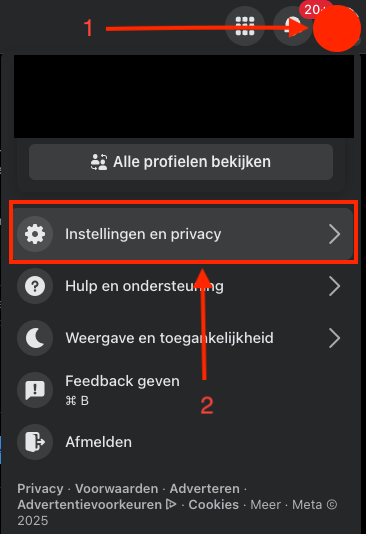
Step 3: Click on Settings.
.png?width=370&height=383&name=unnamed%20(1).png)
Step 4: Scroll down the left-hand menu to Settings & Privacy and click on Business Integrations.
.png?width=349&height=557&name=unnamed%20(2).png)
Step 5: Click on View and Edit and make sure all options are checked. If all options are already checked, you can click Remove and then reconnect/authorize Facebook in our platform for the widget.
.png?width=670&height=183&name=unnamed%20(3).png)